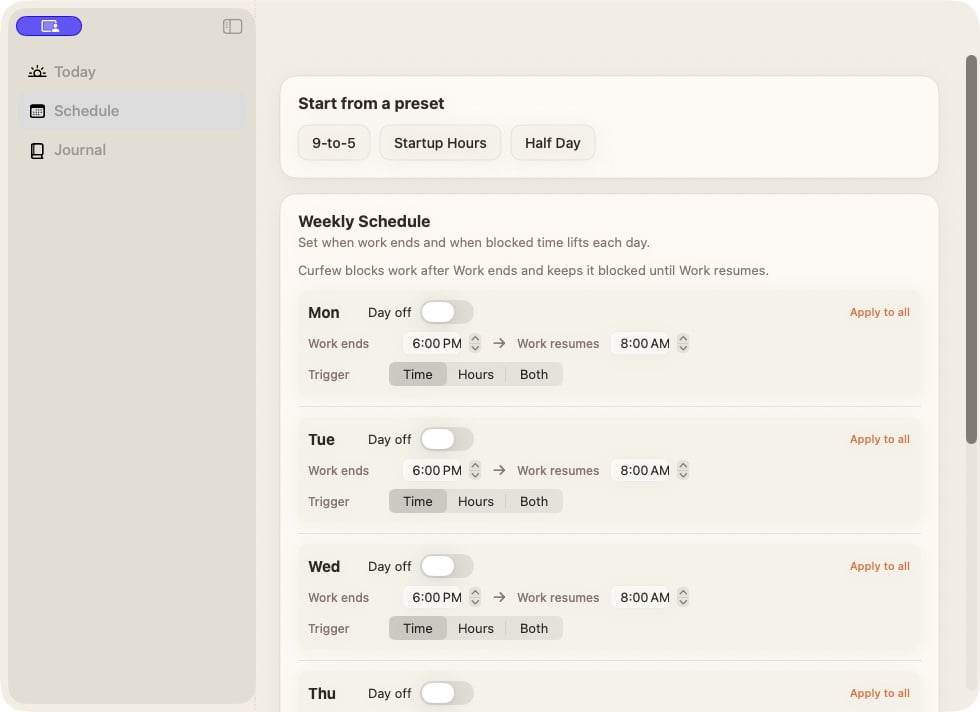
Set a work window
- Start from a preset, or edit a day in Weekly Schedule.
- Set Work ends to your stopping time.
- Set Work resumes to the time you can use the Mac again.
- Turn on Day off for days off. Use Apply to all to copy a day’s rule.
- Read the schedule summary and any Pending Change message.
Choose what triggers lockout
The Trigger control offers a fixed stopping time, an hours limit, or both. With both, reaching either limit ends your session. Check Today for the next boundary.When changes take effect
An edit that loosens one day and tightens another uses the 24-hour cooldown.
During lockout, more permissive changes wait until access resumes.
Check Pending Change for the application time. For extra time today, use
an available extension or override.